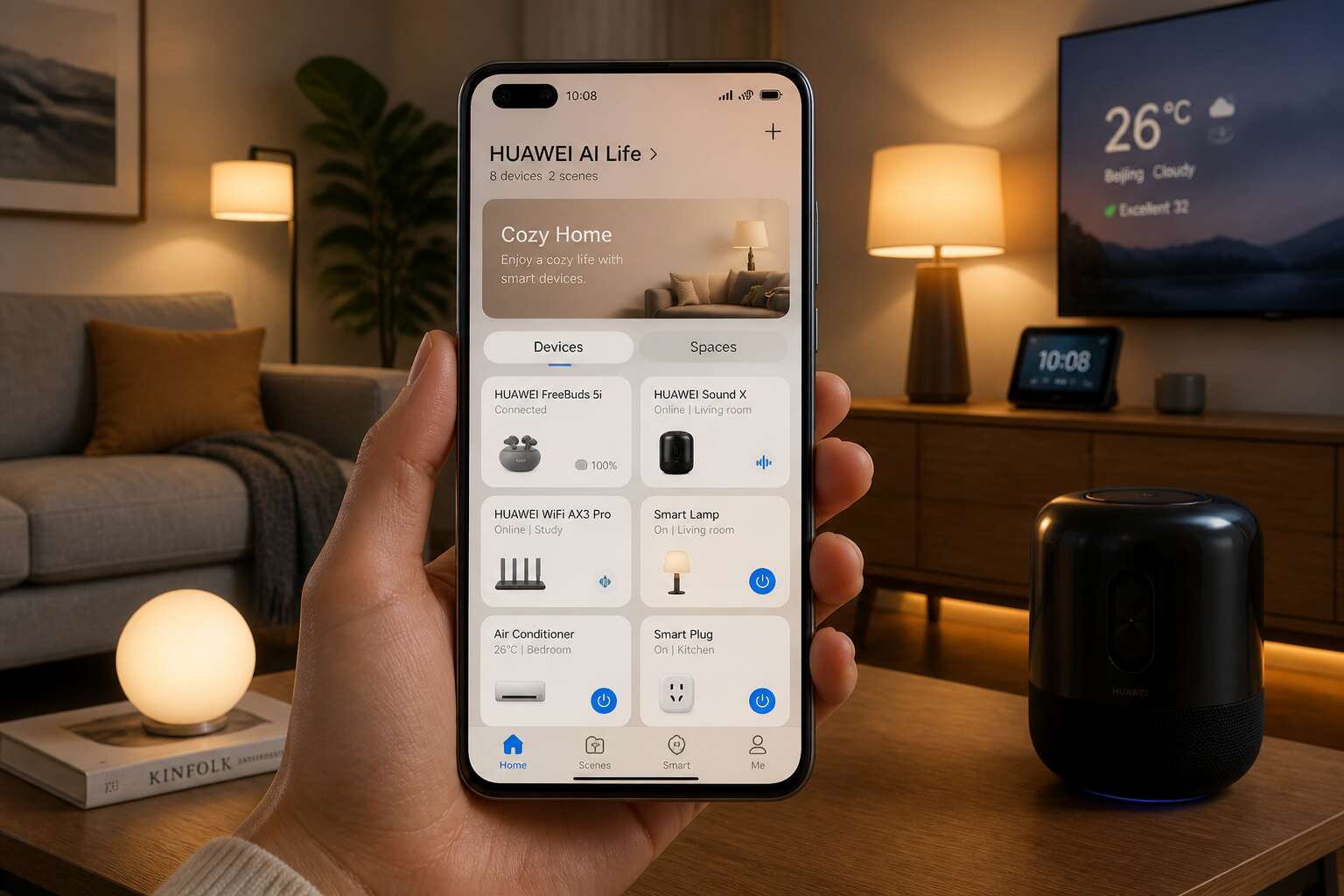
Understanding the AI Life Ecosystem
Defining the Core Functionality and the Overall Purpose
By 2025, South Africa expects over 90 million connected devices. The Huawei AI Life app sits at the centre of this growth, linking your gadgets into one manageable network. I have found that its real strength lies in subtlety, not flashy features.
The core functionality focuses on device orchestration. You can adjust sound profiles for your earbuds, monitor battery levels across accessories, and trigger routine scenes for your smart plugs. The ecosystem handles:
- Automatic firmware updates
- Cross-device synchronisation
- Energy usage reports
This reduces the mental load of managing separate apps. Ultimately, the Huawei AI Life app exists to create a coherent digital environment. It transforms scattered hardware into a single, responsive unit. For South African users dealing with regular load shedding, the app’s scheduling tools become practical survival aids, not just conveniences!
Key Hardware and Compatible Device Brands You Should Know
The huawei ai life app extends beyond Huawei’s own shelves. It coordinates a range of hardware, both familiar and unexpected. While Huawei earbuds, watches, and routers form the foundation, the ecosystem embraces selected third-party brands. Yeelight bulbs, TP-Link plugs, and compatible air conditioners respond to your commands.
The compatibility list grows with each firmware update. You can pair:
– Smart lighting from Yeelight and Philips
– Energy monitors from TP-Link
– Security cameras from various supported manufacturers
This openness matters for load shedding preparation. Your Huawei phone, tablet, and laptop synchronise seamlessly, while partner devices fill the gaps. The result is a web of connected gear, all answerable to one interface.
The Evolutionary Path of Connectivity and Operating System Integration
In South Africa, the huawei ai life app has evolved into a comprehensive ecosystem manager. Households coordinate lighting, security, and energy use through a single interface. What began as a simple device manager has transformed into an operating layer that bridges hardware and software.
The evolutionary path of connectivity shows a clear trajectory. Early smart home apps required manual configuration. Today, the huawei ai life app orchestrates devices through intelligent protocols. Operating system integration means your phone’s OS communicates directly with connected gear, reducing latency and improving reliability.
The ecosystem’s architecture follows a layered approach:
- Device discovery and pairing
- Data synchronisation across platforms
- Intelligent automation based on behaviour patterns
This integration reduces friction across daily routines. The ecosystem learns from usage data, adapting to your habits without requiring constant input.
Essential Features and Automation Benefits for Daily Use
Smart Scene Automations and One-Tap Routine Triggers
One tap transforms a pile of devices into a connected system. For South African homes, the huawei ai life app makes this possible with Smart Scene Automations. These automations react to time, sensor data, or device states. Arrive home and the app unlocks the door, adjusts the thermostat, and turns on the porch light. No manual steps; the logic proceeds in the background.
One-Tap Routine Triggers give you direct control. Press a widget or speak a command, and the app runs a full sequence. A morning routine might include:
- Coffee maker starts at 06:30
- Bedroom blinds open gradually
- Bathroom heater warms up
This method keeps control in your hands. The huawei ai life app executes each step in order, every single day. Automation benefits appear when you save minutes or avoid forgotten chores. That reliability makes it valuable.
Energy Efficiency Metrics and Device Consumption Analysis
Energy waste hides in standby modes and forgotten appliances. The huawei ai life app uncovers the figures behind device consumption analysis. I open a single dashboard and see which plug draws power overnight, or which air conditioner spiked during the afternoon. Those metrics translate directly into rand savings.
Daily use becomes clearer when the app tracks efficiency over time. It compares usage patterns week to week, flagging devices that work harder than they should. The essential list includes:
- Real time wattage per connected socket
- Historical consumption graphs for each device
- Estimated monthly cost in rand
For South African households, this matters beyond convenience. The huawei ai life app turns vague worry about electricity bills into precise numbers you can trust.
Voice Command Interaction and Hands-Free Control Options
The huawei ai life app turns voice into a remote control. Instead of hunting for a phone, you can simply speak. Adjust the lounge light or start the geyser while your hands are full with groceries. That directness saves time in a busy home.
Voice commands work with compatible speakers and your phone’s assistant. Daily use becomes simpler with the huawei ai life app when you try these:
– “Turn on the air conditioner at 22 degrees”
– “Dim the bedroom lights to 50 percent”
– “Set the robot vacuum to clean the kitchen”
The hands-free aspect goes further. The app responds to scheduled prompts and occupancy triggers. Walk into a room and the lights respond without a spoken word. That seamless interaction removes friction from your evening routine, leaving you with more control and less manual effort.
Privacy-First Setup with Local Network Processing
Privacy rarely gets the attention it deserves in the smart home, yet the huawei ai life app builds its foundation around it. A privacy first setup keeps your data within your own network through local network processing. Commands and schedules stay inside your router, never travelling across the internet to distant servers. For South African households, where data costs and load shedding already demand patience, this arrangement feels reassuring.
Essential features grow naturally from that architecture. Devices appear grouped by room, making your morning overview effortless. The app learns your daily rhythms and quietly adjusts connected appliances without constant supervision.
– Geysers switch off after the last shower
– Pool pumps run only during off peak hours
– Indoor lights respond to occupancy, not fixed timers
The huawei ai life app turns everyday living into a coordinated routine while protecting what matters most. Your personal details remain private, and the household runs with less intervention. That is the quiet luxury of a connected home done properly.
Firmware Health Surveillance and Peripheral Gear Maintenance
In a country where load shedding is a familiar part of life, the huawei ai life app offers something more than remote control. It gives you a quiet sense of command over your home’s rhythm. You can check whether your geyser is still on, or when the last firmware update hit your Wi‑Fi router. That might sound small, but on a dark evening in Joburg, it changes everything.
Beyond the obvious on/off buttons, the essential features are built around practicality. Devices appear grouped by room, not just by type. That means you can see the living room’s lights, smart plug, and air conditioner on one screen, without scrolling through a maze. Schedules are equally straightforward. You set a time for the pool pump to start at 5:30 a.m., and the app remembers it, even when you forget. Energy monitoring also shows you which device is drawing power, so you can spot the old heater that eats more than it should.
Automation benefits become obvious when you think about your daily habits. Instead of manually switching off the geyser before peak tariffs, the app can do it based on your own usage pattern. Set a rule: if the geyser hasn’t been used for two hours, switch it off. Or have the lights turn on gradually at sunset, but only in rooms you actually occupy. The huawei ai life app lets you chain these actions together, so the house feels responsive, not robotic. For example, a smart motion sensor can trigger the hallway light, and then send a notification to your phone if motion continues after midnight. That is not just convenience; it is a layer of security that runs quietly in the background.
Firmware health is another area where this app earns its keep. Updates arrive automatically, but the app also lets you see the current version on every device. You can schedule the update window for a time when the family isn’t streaming. If a router needs a reboot, you get a gentle prompt instead of a sudden drop in connectivity. Keeping firmware current also closes security gaps, which matters when your front door lock is part of the same network.
Peripheral gear maintenance often gets overlooked, but the app handles that too. It checks the battery status of sensors, the signal strength of repeaters, and the last time each device checked in. A simple list helps you stay ahead:
- Battery level for each motion sensor and door contact
- Signal strength for every smart plug and bulb
- Next scheduled firmware check for each hub
When a sensor drops below twenty percent, you get an alert before it fails, not after. That saves you from standing in a dark hallway wondering why the light did not turn on. The same attention applies to the router’s memory usage and the smart speaker’s latency. Nothing dramatic, just steady monitoring.
What stands out is the way these pieces fit together. The huawei ai life app does not shout about its features; it simply makes the house run smoother. During a cold winter morning, you wake up to a warm bathroom because the geyser turned on an hour earlier. During a summer storm, you get a notification that the smart lock lost connection, along with a hint to check the repeater. This kind of quiet management is rare in the smart home space, and it is exactly what a South African home needs while the grid does its own unpredictable dance.
Configuring the Application From Scratch
Installation Process on New Smartphones or Tablets
I recall the first time I opened a new device and faced the installation screen for the huawei ai life app. The process is straightforward, yet it demands attention to detail.
Start with pairing the smartphone to the router. Then, the app detects nearby devices. For a new tablet, you must grant permission for local network access. The initial setup takes roughly ten minutes, during which the app identifies compatible gear.
A simple sequence works best!
- Download the huawei ai life app from the official store.
- Create or log into your Huawei account.
- Enable Bluetooth and location services for device discovery.
- Follow the on-screen prompts to pair each device.
After that, the app calibrates each component and stores the configuration locally. No cloud dependency persists after the pairing phase. The entire experience feels deliberate and efficient.
Creating an Optimized Home Interface and User Preferences
The average South African rearranges smart home icons more often than they rearrange actual furniture! The huawei ai life app puts an end to that. When configuring from scratch, skip the default dashboard and open the room editor first. In my setup, that one step assigned every device to a physical space, so lounge controls stopped mingling with the chaos I call my study.
The optimized home interface demands ruthless pruning. Pin only the gear you touch daily: the kettle, the geyser timer, that one lamp you refuse to operate manually. Bury the rest in a submenu.
- Group devices by room and usage frequency.
- Name each one clearly, never leave serial codes.
- Set default views around your morning and evening routines.
User preferences stick with the huawei ai life app. It remembers dimming levels, sensor thresholds, and layout choices after a single session. Set them once and the interface stays quiet, efficient, and entirely out of your way.
Linking External Devices and Peripherals to the Base Hub
When you open the Huawei AI Life app for the first time, the base hub is your anchor. Add it before anything else. The app walks you through pairing in a logical order: power the hub, press the button, scan the QR code. Once the hub registers, external devices follow.
From there, each peripheral connects through the same channel. Sensors, plugs, cameras. The app lists them as they appear. You rename them immediately, or you will drown in serial numbers. A quick tap on each device opens its settings, and you can assign it to a room or a routine.
A few tips from experience:
- Keep the hub within line of sight during setup.
- Pair devices one at a time, not in batches.
- Check for firmware prompts after each connection.
The whole process takes about twenty minutes. After that, the Huawei AI Life app fades into the background and just works. That is the point.
Troubleshooting Common Connectivity Errors and Signal Issues
After the initial setup, the Huawei AI Life app settles into a quiet routine. Configuration from scratch demands attention to network selection. The app prefers a stable 2.4 GHz band for peripheral communication. A 5 GHz network may cause intermittent dropouts, especially in dense residential areas.
When devices fail to respond, the cause is often signal interference. Thick walls, metal appliances, and overlapping Wi-Fi channels all contribute. The app’s diagnostic screen shows signal strength for each device, but interpreting it requires patience.
Common fixes include:
1. Restart the hub and wait for the LED to blink amber.
2. Move the device closer to the hub, then back to its final position.
3. Forget the device in the app and re-pair it.
4. Check for firmware updates after reconnection.
South African users face an additional variable: load-shedding. Power cycling can confuse the hub’s memory. The Huawei AI Life app usually recovers within minutes, but persistent errors require a full reset. The app’s built-in diagnostics offer a starting point, though they rarely explain the root cause.
Advanced User Strategies to Maximize Utility
Custom Profiles for Family Members and Guest Presenters
Custom profiles in the Huawei AI Life app transform a smart home from a single-user tool into a shared residence. For family members, assign specific device permissions and automation schedules that match daily rhythms. A teenager might have access to their room’s lighting and speaker, while parents retain full control over security cameras and energy settings. Guest presenters, meanwhile, benefit from temporary access codes that expire after their visit. This prevents the awkward dance of handing over your unlocked phone to a colleague.
Consider these practical adjustments:
- Set a “guest mode” that limits smart locks and entertainment systems.
- Create a “work trip” profile for visiting contractors who need only hallway access.
The beauty of the Huawei AI Life app lies in its granularity. You avoid the binary choice between full admin and total exclusion. Instead, each person receives a tailored experience, making everyone feel at home without compromising your digital boundaries.
Building Chained Multi-Step Routines for Complex Tasks
Chained routines in the huawei ai life app let you sequence multiple device actions into a single triggering event. Instead of tapping four separate toggles, you define once that “leaving home” runs a cascade: lights off, thermostat set to eco mode, security cameras armed, and the robot vacuum starts its cycle. The sequence is deterministic, so you get predictable behaviour.
For complex tasks like morning preparation, order matters. Your bedroom blinds open first, then the kettle boils, then the bathroom floor heater warms up. Each step waits for the previous one to complete, avoiding the chaos of simultaneous activation.
Consider this chain for a home office refresh during load shedding:
- Smart backup battery charges to full capacity overnight
- At 05:30, the office light warms up gradually
- Your laptop charger switches to the backup battery feed only when the grid fails
- The air conditioner adjusts to a preset temperature
The huawei ai life app evaluates each condition before triggering the next action, delivering reliability where guesswork used to reign.
Analyzing Appliance Health and Automated Maintenance Schedules
Your appliances lie. They hum contentedly until they die, usually at 5 a.m. on a Tuesday, right when you have tea on your mind. The huawei ai life app turns these melodramatic breakdowns into predictable data. It reads energy draw, voltage ripples, and component wear from every connected plug. You watch a fridge compressor sweat before it quits.
Set automated maintenance schedules instead of waiting for the groan. The app learns your usage patterns and triggers service windows during off-peak hours. For example:
- Clean HVAC filters every 90 days of runtime, not calendar days
- Flush the geyser system before winter sag
- Test backup battery health before load shedding stages intensify
That turns a messy repair surprise into a calendar event you control.
Remote Mode for Vacations and Security-Focused Away Scenarios
An empty house behaves differently, and intruders notice. The huawei ai life app remote mode lets you observe your residence from a beach chair in Durban. Lights switch on at plausible intervals, the geyser cycles safely, and each connected camera feeds back without exposing your network. I have used the huawei ai life app to monitor a cottage in the Free State while I was in Cape Town, and the peace of mind was tangible.
Security-focused away scenarios go beyond simple surveillance. You define thresholds: a door sensor opening at 2 a.m. triggers the siren; a sudden current draw from the stove becomes an alert, not a fire. For my own home, I set the app to notify me if the garage door stays open longer than two minutes. That level of granular detail is what turns absence from anxiety.
Integrating Third-Party Services and Alternate Ecosystems
The Description app is more useful and personal when it learns to cooperate with other ecosystems already scattered across your holding. On a small Free State plot, I use a local bridge that speaks to an older third-party weather sensor and a watering controller from a different maker. The bridge filters the signals, and the app simply presents them in order.
Some routines I keep that work well:
- A solar inverter feeds its production reading through the local bridge, and the app logs it alongside the pump patterns.
- A battery monitor for the remote gate speaks its own protocol, but the bridge translates each pulse into something the dashboard understands.
This arrangement means no surplus cloud services are needed. Every contribution arrives at the one screen, so you read the actual state of the land as it is.
Utilizing the Application as a Central Command Center for Smart Homes
By evening in the Free State, the light fails earlier than the calendar promises. The house answers, or it does not, and that matters when you are far from the switchboard. The huawei ai life app places every device under one command screen.
The deeper value appears when you layer devices never designed to meet. A smart geyser, a garage door motor, and a weather station from a separate maker can answer to one rule set. The app keeps their connections stable without forcing you back to a separate vendor’s portal.
- Solar yield from the roof is logged before the kettle switches on.
- The borehole pump verifies its pressure against the day’s forecast.
- An indoor air quality sensor determines whether the east window opens.
Every reading passes through the huawei ai life app. I stand at the sink, coffee in hand, and read the entire property in one glance. No extra portals, no forgotten logins!




0 Comments